Web Programming
Lecture 9
Intro to backend development
and Node.js

Seoul National University of Science and Technology
Information Technology Management
Lecture slides index
April 26, 2026
Agenda
- Web applications architecture
- Web service
- Server-side web frameworks
- Node.js
- Starting a simple Node.js project
Course structure
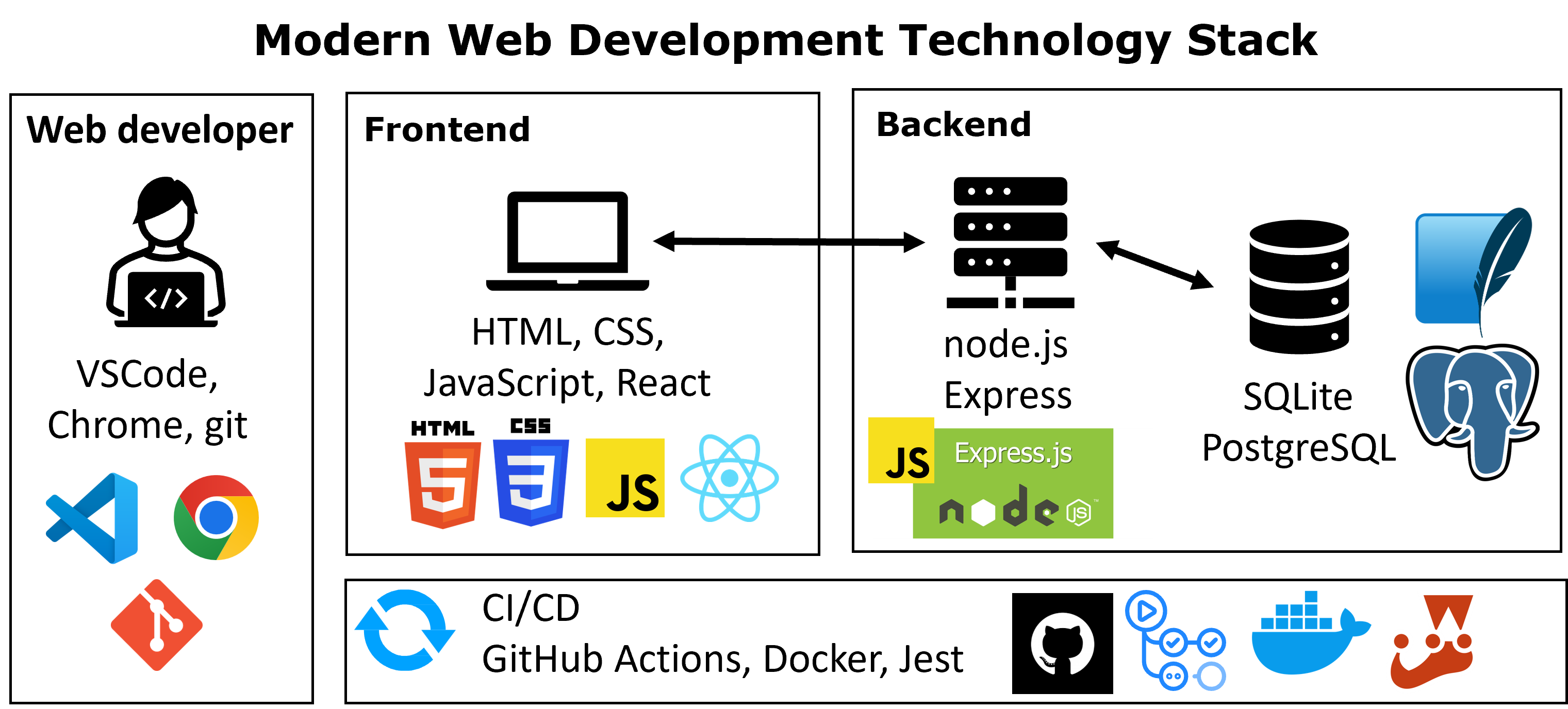
From Frontend to Backend
- So far, we have built:
- Web page structure and appearance with HTML5 and CSS.
- Client-side interactivity with JS DOM manipulation and event-driven programming.
- Fetching data from web servers.
- But we have limitations:
- Data is temporary (lost on refresh)
- No shared data between users
- No real-world functionality (e.g., login, saving data)
Question
How do real applications store and manage data?
Why servers are needed?
Frontend Only
- Temporary data (lost on referesh)
- Single user context
- No persistent storage
With Server
- Persistent data (stored in database)
- Supports multiple users
- Centralized data storage + application logic
Key idea
Servers enable applications to:
- Store and retrieve data (databases)
- Share data across multiple users
- Handle authentication and user management
- Process business logic and requests
Core layers of a web application
Application Layer (Backend / Business Logic)
- Processes incoming user requests and applies business rules and application logic
- Responsible for:
- Routing requests to the correct functionality
- Handling authentication and authorization
- And coordinating services and workflows
- Can be implemented using different languages and frameworks like Node.js (JavaScript), Django (Python), Laravel (PHP), etc.
Data Layer (Database)
- Stores, retrieves, and manages application data
- Ensures data persistence across sessions and users
- Can be relational (MySQL, PostgreSQL) or NoSQL (MongoDB, Redis)
What is Web Application Architecture?
- Web application architecture is the structure that defines how web components—frontend, backend, and database—interact to deliver a complete web application
- Goals of a good architecture:
- Ensure scalability, maintainability, and performance
- Support modularity and evolution of applications
| Name | Year | Description |
|---|---|---|
| Monolithic | before 2000 | Single unit of code, components share the same resources and deployment |
| Tiers and Layers | 2000s | Separation into presentation, business logic, and data layers. Each layer performs a specific function |
| Service Oriented Architecture | Early 2000s | Applications are composed of reusable services. Services communicate through well-defined interfaces (e.g., web services) |
| Microservices | Mid 2010s | Application is divided into small, independent services. Services communicate through APIs. Enables independent deployment and scaling |
What is a Web service?
- A web service is:
- Software functionality that can be accessed over the internet using standard protocols
- A server that listens for requests and provides responses over a network
- Key characteristics:
- Can be implemented in different programming languages
- Accepts input parameters and returns results
- Communicates using HTTP
- Client–server interaction:
- The client (browser or application) sends a request
- The server processes the request and returns a response
- Response formats may include: HTML, Text, JSON and XML
Server-side web frameworks
- Server-side web frameworks (a.k.a. “web application frameworks”) are software frameworks that simplify the development of web applications
- They provide built-in support for:
- Work directly with HTTP requests and responses: Handle HTTP requests and responses without dealing with low-level networking code.
- Route requests to the appropirate handler: Map URL patterns to specific handler functions for organized and maintainable code.
- Make it easy to access data in the request: Provide easy access to request data like URL parameters, POST data, cookies, and session info through built-in objects.
- Abstract and simplify database access: Simplify database operations with built-in Object-Relational Mappers (ORMs).
- Rendering data: Generate dynamic content using templates and easily render data as HTML, JSON, or XML.
- Supporting sessions and user authorization
Popular server-side web frameworks
- Opinionated vs. Unopinionated:
- Opinionated frameworks guide you with built-in best practices, while unopinionated ones give more flexibility in how you structure your code.
- Batteries Included vs. Lightweight:
- Batteries included frameworks offer built-in tools for most tasks, while lightweight ones let you choose and add only what you need.
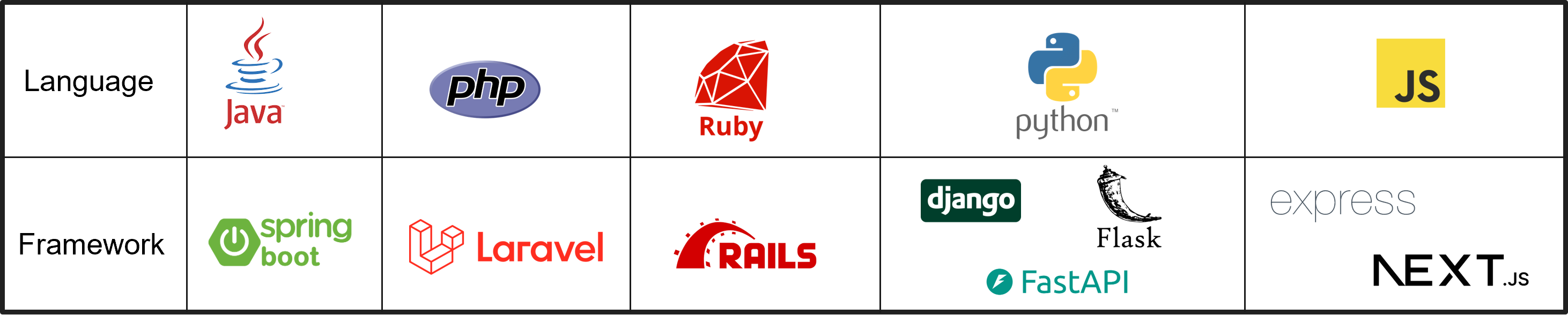
- Server-side applications are written using various programming languages:
- JavaScript, Java, Ruby, Python, PHP among others
REST APIs
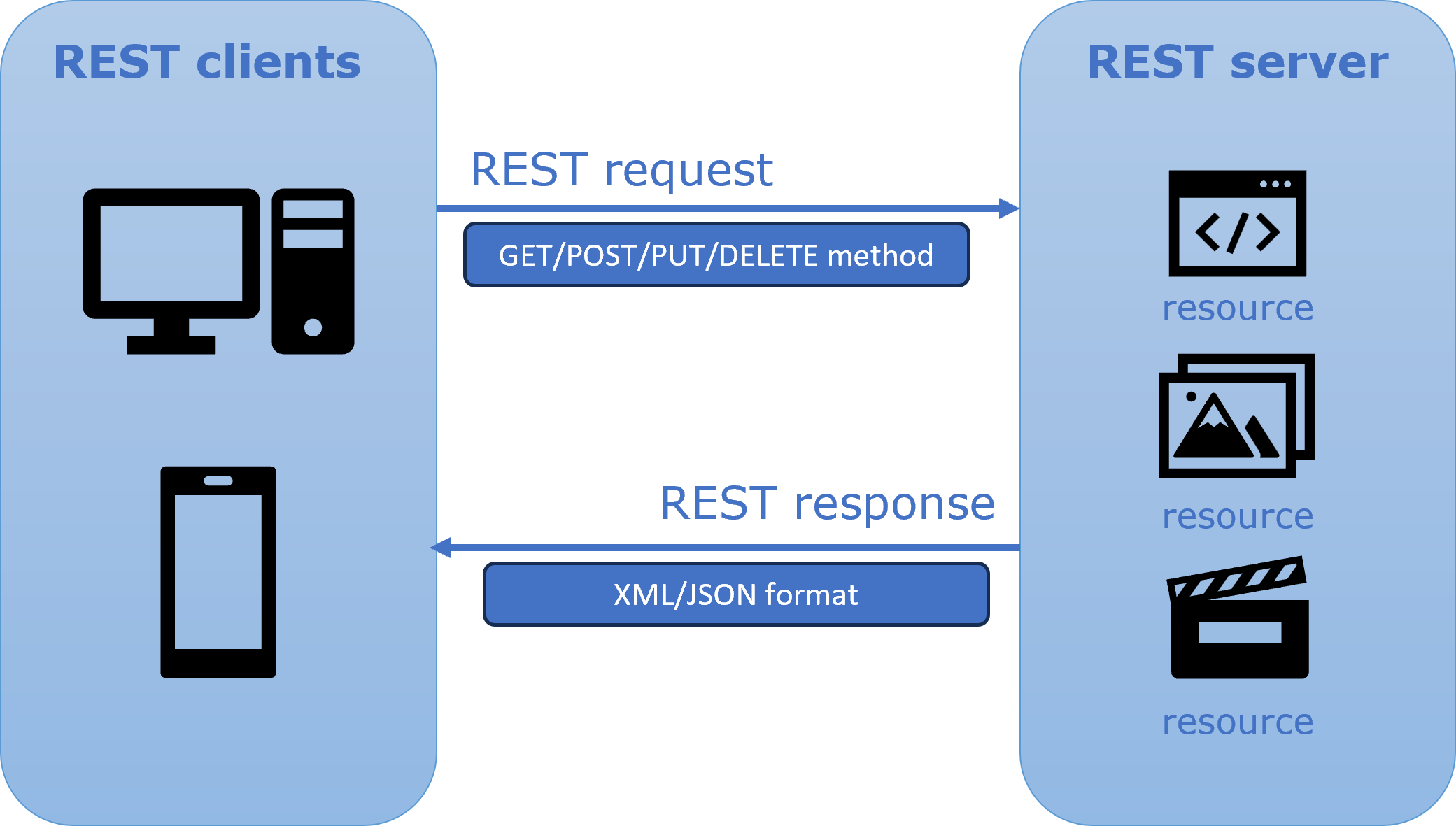
- A REST API (Representational State Transfer) is a type of web service that follows a set of principles for designing networked applications
Key idea:
- The system is organized around resources (data entities)
- Each resource is identified by a URL
- REST APIs use:
- HTTP methods to perform operations on resources
- Standard HTTP protocol for communication
- Characteristics:
- Stateless: each request contains all the information needed
- Client–server separation: frontend and backend are independent
Resources vs endpoints
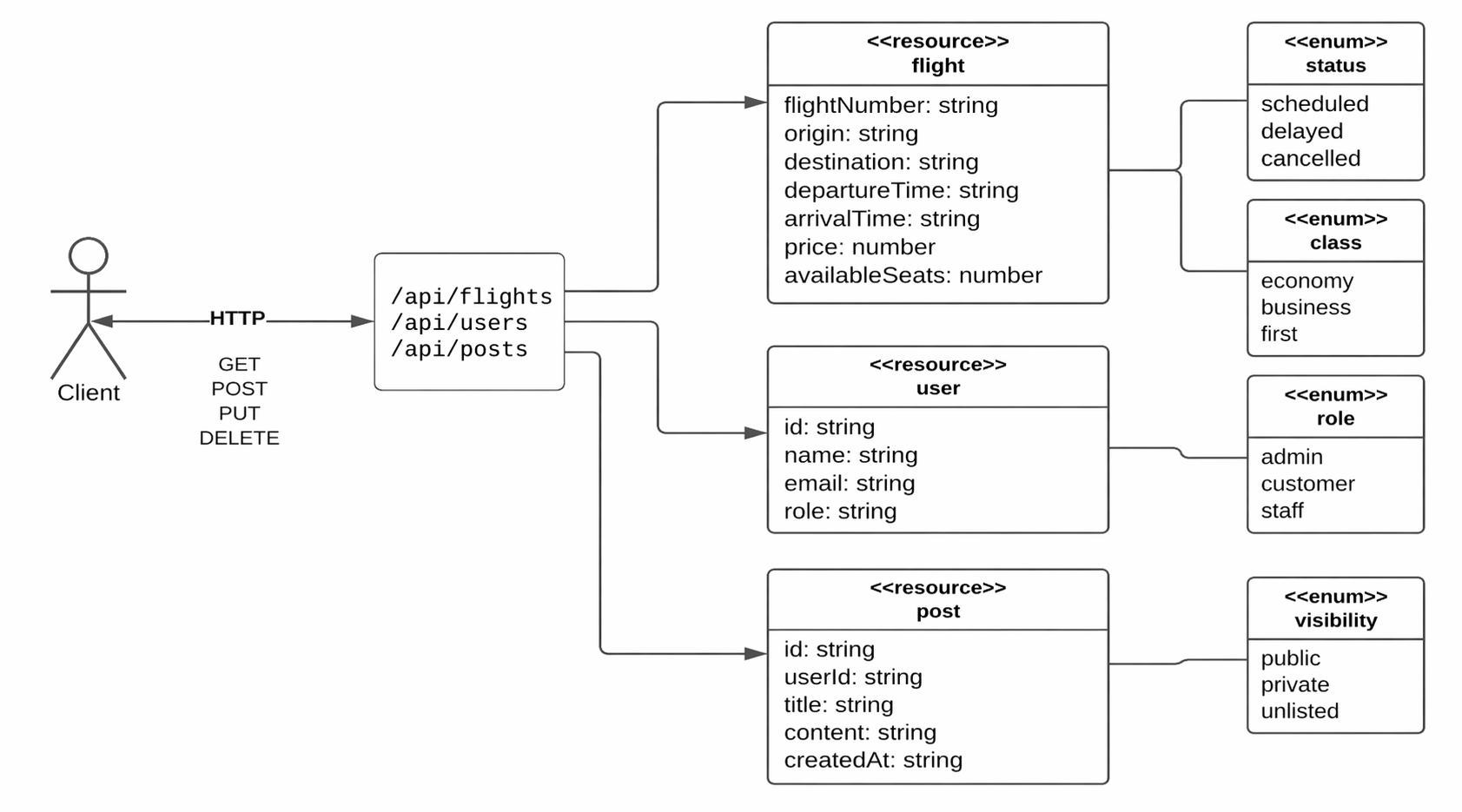
Resource
- Represents a data entity in the system
Endpoint
- A URL used to access a resource
- Defines how the resource can be accessed
HTTP methods - Core operations
- HTTP methods define the type of operation performed on a resource
| Method | Operation | Example |
|---|---|---|
| GET | Retrieve data from a resource | - GET /flights → retrieve all flights - GET /flights/123 → retrieve a specific flight |
| POST | Create a new resource | POST /flights → create a new flight |
| PUT / PATCH | Update an existing resource - PUT: replace entire resource - PATCH: update part of the resource |
- PUT /flights/123 → update a flight |
| DELETE | Remove a resource | - DELETE /flights/123 → delete a flight |
HTTP status codes
- HTTP status codes indicate the result of a request
| Status code | Description | Example |
|---|---|---|
| 200 OK | Request was successful | - GET /flights/123 → 200 OK |
| 201 Created | Resource was successfully created | POST /flights → 201 Created |
| 400 Bad Request | Invalid request (e.g., missing or incorrect parameters) | POST /flights (invalid data) → 400 Bad Request |
| 401 Unauthorized | Authentication is required or failed | GET /flights/123 (without authorization) → 401 Unauthorized |
| 404 Not Found | Requested resource does not exist | GET /flights/999 → 404 Not Found |
| 500 Internal Server Error | Server encountered an unexpected error | GET /flights/567 → 500 Internal Server Error |
Good API design principles
Key idea
A well-designed API should follow consistent and predictable patterns
Key Principles
- Statelessness
- Each request contains all the information needed
- The server does not store client-specific session state between requests
- Consistency
- Use consistent structure for endpoints and responses
- Similar operations should follow the same patterns
Naming conventions in APIs
API endpoints should be simple, consistent, and easy to understand
- Use nouns, not verbs
/flights
- Use plural names for collections
/flights,/users,/posts
- Keep URLs clean and readable
- Avoid unnecessary complexity
- Use a hierarchical structure when appropriate
/users/123/posts
- APIs may include a version in the URL
/api/v1/flights- Allow changes without breaking existing clients
| Good (Recommended) | Avoid (Not Recommended) |
|---|---|
/flights |
/getFlights |
/users |
/userList |
/posts |
/fetchPosts |
/users/123/posts |
/getUserPosts |
/api/v1/flights |
/flightsV1 |
API ecosystem overview
| Type | Approach | Typical Use Case |
|---|---|---|
| REST (Architectural Style) |
- Resource-based (URLs represent data) - Uses HTTP methods (GET, POST, etc.) - Simple, flexible, widely used |
Public APIs, web apps |
| GraphQL (Query Language) |
- Client specifies exactly what data it needs - Single endpoint - Reduces over-fetching and under-fetching |
Flexible frontend data |
| gRPC (Communication Framework) |
- Based on Remote Procedure Calls (RPC) - Uses Protocol Buffers (binary format) - High performance, often used for service-to-service communication |
Microservices communication |
| SOAP (Protocol) |
- XML-based messaging protocol - Strict structure and formal contracts - Common in legacy and enterprise systems |
Legacy enterprise systems |
Introduction to Postman
API endpoints can be tested without building a frontend
What is Postman?
- Tool to send HTTP requests to APIs
- Allows interaction with endpoints directly
- No frontend required
Why use Postman?
- Test API behavior
- Debug requests and responses
- Verify data returned by the server
Request
- HTTP Method (GET, POST, etc.)
- URL (endpoint)
- Optional data (body, parameters)
Response
- JSON data
- Status code
- Headers
Key idea
Postman allows you to interact with APIs directly, without a frontend
Practical session — Building our first API
In this practical session, we will move from concepts to implementation.
We will use:
- Node.js to run JavaScript on the server
- Express to build a simple API
- Postman to test our endpoints
Our example in this session will be:
/flights
Goal
Build and run a simple local API that returns flight data
JavaScript Beyond the Browser
- So far, we have used JavaScript in the browser (client-side) to add interactivity to our web pages
- In the browser, JavaScript can interact with the DOM, including objects such as
windowanddocument - In this session, we will use JavaScript on the server
- This allows us to:
- handle HTTP requests
- build APIs
- return data to clients
Node.js: Server-side JavaScript
- Node.js uses the same JavaScript language, but runs it outside of the browser
- Node.js is a runtime environment for running JavaScript programs on the server
- When using Node.js, you do not have access to browser objects such as:
documentwindow- DOM nodes
- Instead, you have access to functionality for:
- handling HTTP requests
- file I/O
- database interaction
Client-side vs. Server-side JavaScript
Client-side
- Runs in the browser
- Has access to
document,window, and the DOM - Handles user interaction and events
- Calls APIs using
fetch - Runs while the web page is open
Server-side
- Runs with Node.js
- Handles incoming HTTP requests
- Sends HTTP responses back to clients
- Can work with files and databases
- Runs as long as the server is active
Starting a Node.js Project
- There are a few standard steps to starting a Node.js application
- Most projects follow a similar structure
- Start a new project directory (e.g.
flights-api) - Create your
app.jsfile - Run
npm initto initialize apackage.jsonfile - Install the packages you need with
npm install - Write your Node.js code in
app.js
npm(Node Package Manager) helps install and manage dependencies used by your project
Starting app.js
- Run
npm install expressto install the Express.js package - Build your basic app with the following file
- Check whether your service is running correctly by opening:
const express = require('express');
const app = express();

const PORT = 8080;

app.get('/flights', function (req, res) {
  const flights = [
    { id: 1, origin: "Seoul", destination: "Tokyo" },
    { id: 2, origin: "Paris", destination: "London" }
  ];

  res.json(flights);
});

app.listen(PORT, () => {
  console.log(`Our Node app is listening on port ${PORT}`);
});
Important
package.json: stores metadata about the project, including its name, version, dependencies, scripts, and configuration.
package-lock.json: is generated automatically by npm and locks the exact versions of installed dependencies, helping ensure consistent installations across environments.
Node.js modules
- When you run a
.jsfile with Node.js, you have access to standard JavaScript functions (e.g.console.log) - To get additional functionality, such as handling HTTP requests, you import modules
- In Node.js, you do this with the
require()function
- Here,
expressis the module we use to create our web server
app.listen()
- To start the local server, Express needs a port number to listen on
- The
app.listen()function starts the server
Note
localhost refers to your own computer.
When you open http://localhost:8080, you are connecting to a server running on your machine.
Basic Routing in Express
- Routes are used to define endpoints in your web service
- In this session, we will start with the
GETmethod app.get()allows us to create a GET endpoint- It takes two arguments:
- the endpoint path
- a callback function that handles the request and sends the response
Adding Routes in Express
reqis the request objectresis the response objectIn this example, the server sends JSON data back to the client using
res.json(...)If the visited endpoint has no matching route in your Express app, the server returns 404 (Not Found)
Sending JSON Responses
- In our API, we will mainly return JSON data
- Express provides
res.json(...)for this purpose
- This sends the data as JSON and sets the correct content type automatically
Testing with Postman
- Open Postman
- Create a request with:
- Method: GET
- URL:
http://localhost:8080/flights
- Click Send
- You should see:
- JSON data
- Status code 200 OK
Tip
Postman allows you to test your API without building a frontend
Next week
- Request parameters
- More response methods
- Better API handling

Acknowledgements
- Some contents of this lecture are partially adapted from:
- Harvard CS50’s Web Programming with Python and JavaScript, licensed under CC BY-NC-SA 4.0.
- Materials from University of Washington’s CSE 154 Web Programming (used with permission).
- The Odin Project (main website code under MIT license and curriculum licensed under a CC BY-NC-SA 4.0)
- The Fundamentals of Web Application Development (Web Edition) ©2025 Nicholas D. Freeman. All rights reserved. The content is provided for educational purposes only and is not an exhaustive treatment of the subjects.
- freeCodeCamp.org © 2025 freeCodeCamp.org. All rights reserved. The content is provided for educational purposes only and is not an exhaustive treatment of the subjects.
- Node.js for Beginners by Ulises Gascón. Some contents adapted under fair educational use for instructional purposes.

Web Programming