Web Programming
Lecture 6

Promises, async/await and fetch

Josue Obregon

Seoul National University of Science and Technology
Information Technology Management
Lecture slides index

March 31, 2026

Course structure

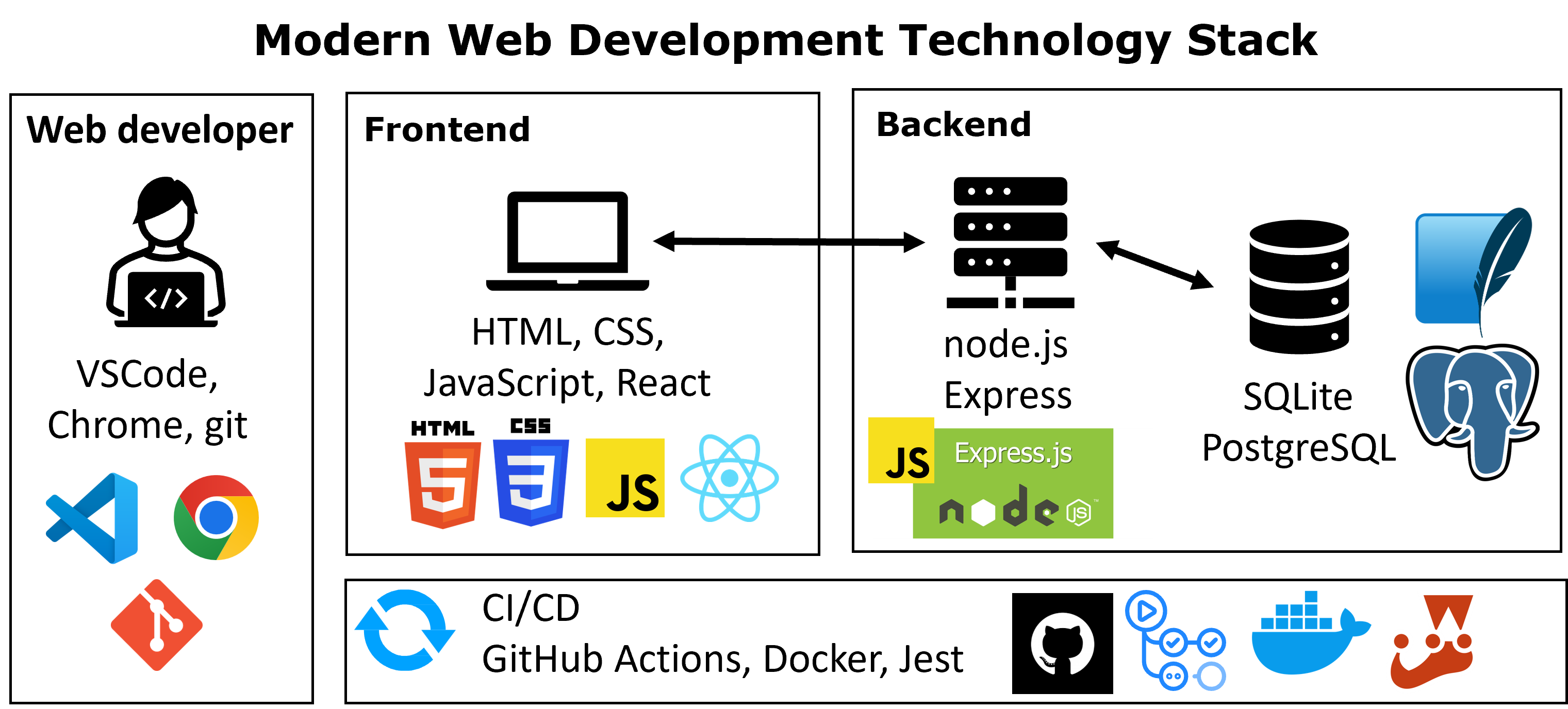
Roadmaps: Frontend, backend and fullstack

Agenda

  • Introduction to Promises
  • Writing async code with async / await
  • Fetching data using the Fetch API
  • Understanding and using JSON data
  • Putting everything together: a simple real example

Recap: Callback hell

  • Last lecture, we used callbacks to handle asynchronous operations
  • When multiple async tasks depend on each other, callbacks become nested
  • This leads to code that is hard to read and maintain
doTask1(function(result1) {
    doTask2(result1, function(result2) {
        doTask3(result2, function(result3) {
            console.log(result3);
        });
    });
});
  • Key problems:
    • Deep nesting → difficult to understand flow
    • Harder to debug and handle errors

Why do we need promises?

  • Callbacks lead to deeply nested code (callback hell)
  • It is difficult to follow the execution flow
  • Error handling becomes complicated
  • We need a cleaner and more structured way to handle async operations

Solution:

  • Promises provide a better way to manage asynchronous results
  • They allow us to write code in a more readable and organized way

Promises

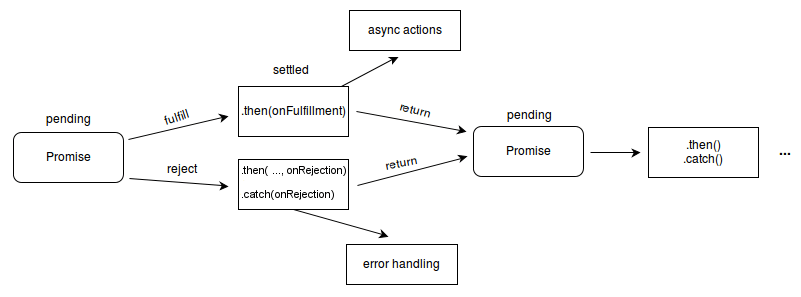
  • A Promise is an object that represents the result of an asynchronous operation
  • The result may be available now, later, or never
  • A Promise has three states:
    • Pending → after the promise is created and while the operation is still in progress
    • Fulfilled → the operation completed successfully
    • Rejected → the operation failed
  • After a promise is fulfilled or rejected, it becomes unchangeable
    • To manage fulfillment, the then method is employed, while the catch method is used to address the rejection of the promise.

Using a Promise (.then() and .catch())

  • We use .then() to handle the result when a Promise is fulfilled
  • We use .catch() to handle errors when a Promise is rejected
doTask1()
  .then(result => {
      console.log("Success:", result);
  })
  .catch(error => {
      console.log("Error:", error);
  });

Promise chaining

  • Promises allow us to run asynchronous operations in sequence
  • Each .then() receives the result from the previous step
doTask1()
  .then(result1 => {
      return doTask2(result1);
  })
  .then(result2 => {
      return doTask3(result2);
  })
  .then(finalResult => {
      console.log(finalResult);
  })
  .catch(error => {
      console.log("Error:", error);
  });
  • Each step returns a Promise → the next .then() waits for it
  • A single .catch() at the end of a chain captures any rejection or error thrown from any preceding .then() block

Callback hell with promises

  • Promises are a great way to deal with the limitations that callbacks introduce when we need to perform multiple asynchronous operations that should be executed in a consecutive order.

  • Promises will handle errors more easily, so the readability of the code should be clearer and easier to maintain in long term.

readFile("docs.md")                    // returns a Promise
  .then(convertMarkdownToHTML)        // gets the content of docs.md
  .then(addCssStyles)                 // gets the HTML from the previous step
  .then(docs => saveFile(docs, "docs.html")) // saves the final version
  .then(ftp.sync)                     // syncs to the server
  .then(result => {
    // do something with result
  })
  .catch(error => console.log(error));
  • Note that Each .then(...) receives the resolved value from the previous Promise, and passes its own result to the next .then().
    • This means that when you pass a function reference like in the left code block, is the same as writing the contents of the right code block
.then(convertMarkdownToHTML)
.then(data => convertMarkdownToHTML(data))

Async/Await

  • async and await provide a cleaner way to work with promises (introduced in ES2017)
  • These keywords are syntactic sugar for promises
    • they are not a new way to handle asynchronous code, but they make the code much easier to read and write
  • They allow asynchronous code to look like synchronous code
  • async is used to define a function that returns a Promise
  • await pauses execution until the Promise is resolved

The async keyword

  • The async keyword is used to define an asynchronous function
  • An async function always returns a Promise
async function getData() {
    return "Hello";
}

getData();  // Promise {<fulfilled>: 'Hello'}
  • The function returns a Promise that resolves to “Hello”

The await keyword

  • The await keyword is used inside an async function
  • It pauses execution until a Promise is resolved
  • It returns the result of the Promise
function doTask() {
    return Promise.resolve("Task completed");
}

async function runTask() {
    const result = await doTask();
    console.log(result);
}

runTask(); // Task completed
           // Promise {<fulfilled>: undefined}

.then() vs async/await

  • Both approaches handle Promises
  • They produce the same result, but with different syntax

.then()

doTask()
  .then(result => {
      console.log(result);
  })
  .catch(error => {
      console.log(error);
  });


async/await

async function runTask() {
    try {
        const result = await doTask();
        console.log(result);
    } catch (error) {
        console.log(error);
    }
}

runTask();
  • async/await makes asynchronous code easier to read

Error handling with try/catch

  • When using async/await, we handle errors with try/catch
    • All code to execute in success cases goes in the try block
    • Error handling code goes in the catch block
  • This replaces .catch() in promise chains
async function runTask() {
    try {
        const result = await doTask();
        console.log("Success:", result);
    } catch (error) {
        console.log("Error:", error);
    }
}

What is fetch()?

  • fetch() is a built-in browser function used to request data from a server
  • It is commonly used to retrieve data from APIs
  • fetch() returns a Promise

Basic usage

fetch("https://api.example.com/data")
  • fetch() starts a request and returns a Promise that will contain the response

Using fetch() with .then()

  • fetch() returns a Promise
  • We use .then() to process the response
fetch("https://pokeapi.co/api/v2/pokemon/gengar")
  .then(response => response.json())
  .then(data => {
      console.log(data);
  })
  .catch(error => {
      console.log("Error:", error);
  });

Note

response.json() also returns a Promise

Why do we use response.json()?

  • The result of fetch() is a Response object, not the actual data
  • The data is inside the response body (more on this, next week)
  • We must convert it into usable JavaScript data

Important

  • response.json() reads the response body
  • It converts JSON text into a JavaScript object
  • It returns a Promise

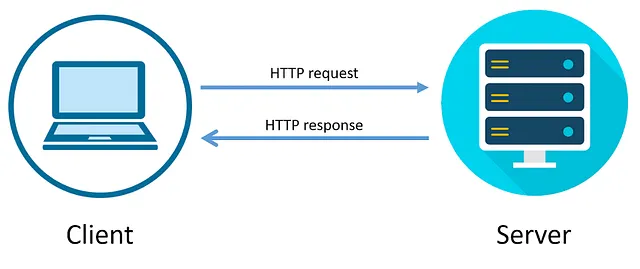
sequenceDiagram
    participant Client
    participant Server

    Client->>+Server: Request
    Note right of Server: Processing Request...
    Server-->>-Client: Response

Using fetch() with async/await

  • We can use async/await instead of .then() for better readability
async function getData() {
    try {
        const response = await fetch("https://pokeapi.co/api/v2/pokemon/abra");
        const data = await response.json();
        console.log(data);
    } catch (error) {
        console.log("Error:", error);
    }
}

getData();

Note

Each await waits for a Promise to resolve

What is JSON?

  • JSON (JavaScript Object Notation) is a format for storing and exchanging data
  • It is commonly used when sending data between a server and a client
  • JSON is written as text, but represents structured data

{
  "name": "charmander",
  "height": 6,
  "type": "fire"
}

JSON rules

  • Data is written as key–value pairs
  • Keys must be strings (in double quotes)
  • Values can be:
    • string, number, boolean, array, object
  • Strings must use double quotes
  • No functions or undefined values allowed
{
  "name": "Mario",
  "score": 100,
  "isActive": true,
  "items": ["coin", "mushroom", "star"],
  "stats": {
    "level": 10,
    "lives": 3,
    "powerUp": false
  }
}

JSON vs JavaScript Object

  • JSON is a way of representing objects, or structured data.
    • The technical term is “serializing” which is just a fancy word for turning an object into a savable string of characters
  • Key differences:
    • JSON keys must use double quotes
    • JavaScript objects can use unquoted keys
    • JSON does not support functions
const jsonString = '{"name": "Mario", "score": 100}';

const obj = JSON.parse(jsonString);      // JSON → JavaScript object
const json = JSON.stringify(obj);       // JavaScript object → JSON

Accessing JSON data

  • After parsing JSON, we work with a JavaScript object
  • We can access values using dot notation or brackets
{
  "id": 1,
  "name": "Leanne Graham",
  "username": "Bret",
  "email": "Sincere@april.biz",
  "address": {
    "street": "Kulas Light",
    "suite": "Apt. 556",
    "city": "Gwenborough",
  },
  "phone": "1-770-736-8031 x56442",  
}
async function loadCharacter() {
    const response = await fetch("https://jsonplaceholder.typicode.com/users/1");
    const data = await response.json();

    console.log(data.name);
    console.log(data.username);
    console.log(data.address.city);
}

loadCharacter();

From Request to Data

  • We request data using fetch()
  • The server sends a response
  • We convert the response using response.json()
  • We use the resulting JavaScript object in our code
async function getData() {
    const response = await fetch("https://jsonplaceholder.typicode.com/users/1");
    const data = await response.json();

    console.log(data.name);
}

Flow

  • fetch()Promise
  • response.json()Promise
  • data → JavaScript object

Next week

  • Today, we used fetch() to get data
  • But…
    • Where does this data come from?
    • How does the browser communicate with a server?
  • Next week:
    • Client vs Server, HTTP requests and responses, APIs and how they work
Acknowledgements


Back to title slide Back to lecture slides index