
flowchart LR
BUILD[BUILD]:::ci --> TEST[TEST]:::ci --> MERGE[MERGE]:::ci
MERGE --> DELIVERY[AUTOMATICALLY<br>RELEASE TO<br>REPOSITORY]:::cd
DELIVERY --> DEPLOY[AUTOMATICALLY<br>DEPLOY TO<br>PRODUCTION]:::cdeploy
subgraph CI["CONTINUOUS INTEGRATION"]
BUILD
TEST
MERGE
end
subgraph CDEL["CONTINUOUS DELIVERY"]
DELIVERY
end
subgraph CDEP["CONTINUOUS DEPLOYMENT"]
DEPLOY
end
classDef ci fill:#cfe5e8,stroke:#2d6e7e,stroke-width:1px,color:#000
classDef cd fill:#b22234,stroke:#7a1320,stroke-width:1px,color:#fff
classDef cdeploy fill:#7a1320,stroke:#4a0b14,stroke-width:1px,color:#fff
classDef phase fill:transparent,stroke:transparent
class CI,CDEL,CDEP phase
Web Programming
Lecture 13
Testing and CI/CD in web applications
Josue Obregon 
Seoul National University of Science and Technology
Information Technology Management
Lecture slides index
May 24, 2026
Agenda
- Testing principles in web applications
- Unit testing with Jest
- Service tests with SuperTest
- End-to-end testing overview
- CI/CD in web applications
- Practical: adding tests and CI to the Flights API
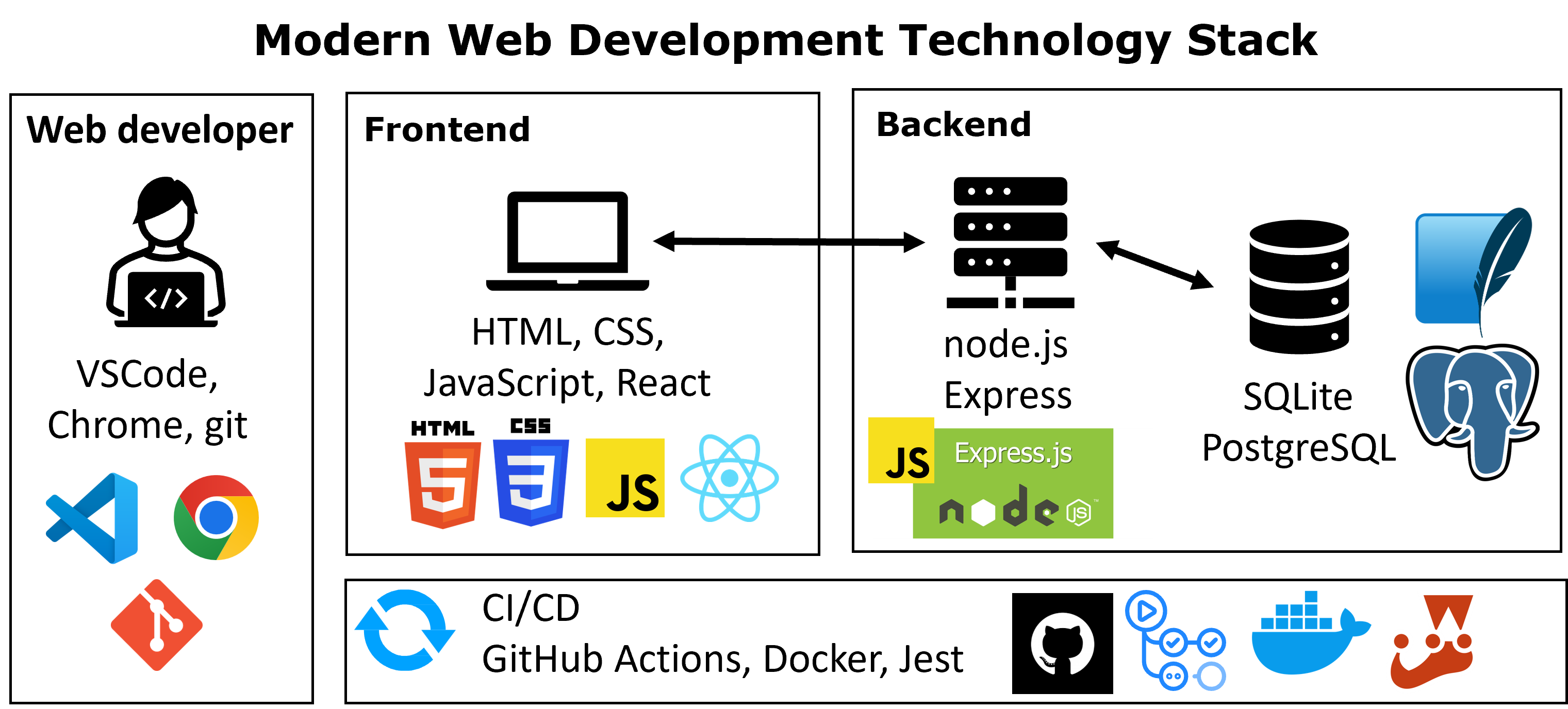
Course structure
Why automated testing
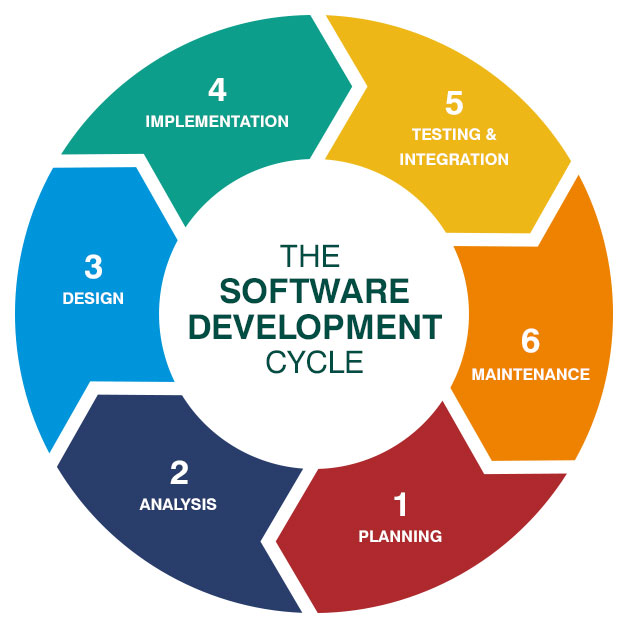
- Web applications evolve through repeated cycles of implementation, integration, deployment, and maintenance.
- Each change risks breaking previously working functionality (regression).
- Manual testing does not scale:
- Slow, inconsistent, and skipped under pressure
- Cannot cover every code path on every change
- Automated tests:
- Execute in seconds on every change
- Provide a precise, reproducible record of expected behavior
- Enable safe refactoring, behavior is preserved as long as tests pass
- Are the foundation that makes Continuous Integration possible
Test Driven Development
- A development practice where tests are written before the production code they verify.
- The classic cycle is Red-Green-Refactor:
- Red: write a failing test that describes the next required behavior
- Green: write the minimum code that makes the test pass
- Refactor: clean up the implementation while keeping the test green
- Consequences of this discipline:
- Each feature ships with a regression test from day one
- The design is driven by how the code is used, not how it is implemented
- The test suite grows incrementally and remains relevant
- When fixing a bug, the same idea applies in reverse: first write a test that reproduces the bug, then fix the code until the test passes.
The test pyramid
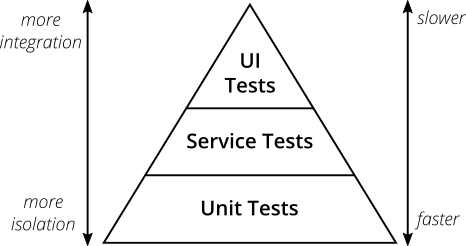
- Unit tests: verify individual functions or modules in isolation.
- Fast, deterministic, and cheap to maintain
- Form the broad base of the suite
- Service tests: verify backend behavior at the API or service layer, independent of the user interface.
- Cover route handlers, controllers, and the integration between them
- Slower than unit tests but more representative of real usage
- UI / end-to-end tests: drive the application through the browser, as a real user would.
- Highest confidence, but slow, fragile, and expensive to maintain
- Reserved for critical user workflows
Testing principles
- Fast
- Tests should run in seconds, not minutes
- Slow suites are run less often and lose their value as a feedback loop
- Trustable
- Isolated: no dependency on the network, the file system, or shared state
- Deterministic: same input always produces the same outcome
- Independent: each test passes or fails on its own, regardless of execution order
- Flaky tests (random pass/fail) erode confidence in the entire suite
- Maintainable
- Readable: the intent of the test is clear from its name and body
- Single responsibility: each test verifies one behavior
- Small: many small focused tests are preferred over a few large complex ones
Arrange–Act–Assert
- A common pattern for structuring the body of a test in three clear sections:
- Arrange: prepare inputs, configure dependencies, set up the system under test
- Act: execute the single operation being verified
- Assert: check that the resulting state or output matches expectations
- Benefits:
- Each test reads as a small specification: “given X, when Y happens, then Z”
- Reviewers locate the assertion immediately
- A test that needs multiple Acts is usually doing too much and should be split
Test doubles
- A test double is any object that replaces a real dependency during a test.
- Three useful categories:
- Stub: returns predefined values, allowing the test to control inputs to the system under test
- Mock: a stub that also records how it was called; the test can assert on calls and arguments
- Spy: wraps a real function while recording its invocations
- Why test doubles are needed:
- Isolate the unit under test from databases, network, and the file system
- Make tests fast and deterministic
- Exercise error paths that are hard to trigger with the real dependency
Testing tools and Jest
- A testing setup combines three kinds of tools:
- Test runner: discovers test files, executes them, reports results
- Assertion library: expresses expectations about values and behavior
- Mocking utilities: replace real dependencies during a test
- Two main options in the Node.js ecosystem:
- Node.js built-in runner (
node:test+node:assert): no extra dependencies, suitable for small projects - Jest: complete framework: runner, assertions, mocks, coverage, in a single package
- Node.js built-in runner (
- This course uses Jest: it covers the three categories above and is the standard choice for backend and frontend JavaScript projects.
A unit test with Jest
- The structure follows Arrange–Act–Assert.
describegroups related cases;test(orit) declares an individual case.expect(value).toBe(expected)performs the assertion.- Jest provides many matchers beyond
toBe:toEqualfor deep equality on objects and arraystoThrowfor error-throwing functionstoBeNull,toBeUndefined,toBeTruthy, …
- The test file lives next to the code it verifies, named
[name].test.js. describe,test, andexpectare available globally inside test files, norequirestatement needed
utils.test.js
const { sum, multiply, divide } = require("../utils");

describe("utils: sum", () => {
  test("adds two numbers", () => {
    expect(sum(1, 2)).toBe(3);
  });
});

describe("utils: divide", () => {
  test("divides two positive numbers", () => {
    expect(divide(10, 2)).toBe(5);
  });
  test("returns Infinity when dividing by zero", () => {
    expect(divide(10, 0)).toBe(Infinity);
  });
  test("returns NaN when dividing zero by zero", () => {
    expect(Number.isNaN(divide(0, 0))).toBe(true);
  });
});
Code coverage
- Coverage reports which lines, branches, and functions of the codebase are executed when the test suite runs.
- Typical metrics:
- Statement / line coverage: percentage of executable lines reached
- Branch coverage: percentage of
if/elseandswitchbranches exercised - Function coverage: percentage of functions invoked at least once
- Uses and limits:
- Reveals untested code paths and forgotten error branches
- Measures execution, not correctness, which means that a covered line can still be wrong
- 100% coverage is rarely a meaningful goal; treat coverage as a guide
npm run test:coverageproduces a terminal summary and a detailed HTML report undercoverage/lcov-report/index.html, with each line colored by coverage status.
Testing an Express API
- Service tests verify the backend at the HTTP boundary:
- Status codes for valid and invalid inputs
- Shape of the JSON response body
- Authentication and authorization rules
- Error propagation from lower layers
- To test the app without binding a real port,
app.jsexports the Expressapp, andserver.jscallslistenon the chosen port. - Tests import
appdirectly and feed it to a request library (SuperTest).
SuperTest and mocking the database
- SuperTest simulates HTTP requests against an Express
appwithout starting a real server. - Supports every HTTP method, custom headers, and JSON bodies.
- Service tests should not depend on a real database:
- Real databases are slow and stateful
- Error paths are hard to trigger
jest.mock(modulePath)replaces every exported function of a module with a mock.- The test then sets per-case return values:
Service test: GET /flights/:id
- Endpoint behavior to verify on the Flights API from previous lectures:
200: flight exists, JSON body matches the expected shape404: no flight with that id500: unexpected error in the data layer
- The model is mocked, so the test controls exactly which scenario the controller faces.
- Each
testblock follows Arrange–Act–Assert:- Arrange: configure the mock
- Act: send the request with SuperTest
- Assert: check status and body
tests/flights.test.js
const request = require("supertest");
const app = require("../app");

jest.mock("../models/flightsModel");
const flightsModel = require("../models/flightsModel");

describe("GET /flights/:id", () => {
  test("returns 404 when the flight does not exist", async () => {
    flightsModel.findById.mockResolvedValue(null);
    const res = await request(app).get("/flights/999");
    expect(res.statusCode).toBe(404);
  });

  test("returns 200 and the flight when it exists", async () => {
    flightsModel.findById.mockResolvedValue({
      id: 1, origin: "Seoul", destination: "Tokyo", duration: 120
    });
    const res = await request(app).get("/flights/1");
    expect(res.statusCode).toBe(200);
    expect(res.body).toEqual({
      id: 1, origin: "Seoul", destination: "Tokyo", duration: 120
    });
  });

  test("returns 500 when the model throws", async () => {
    flightsModel.findById.mockImplementation(() => {
      throw new Error("DB failed");
    });
    const res = await request(app).get("/flights/1");
    expect(res.statusCode).toBe(500);
  });
});
Service test: protected endpoint
POST /flightsis protected by the JWT middleware from Lecture 12.- Two behaviors to verify:
- Request without an
Authorizationheader →401 - Request with a valid token →
201and the new resource
- Request without an
- To produce a valid token in the test, the same
jsonwebtokenlibrary and secret are used to sign a payload. - The model is mocked again so no real database is touched.
tests/flights.protected.test.js
const request = require("supertest");
const jwt = require("jsonwebtoken");
const app = require("../app");

jest.mock("../models/flightsModel");
const flightsModel = require("../models/flightsModel");

const token = jwt.sign(
  { sub: 1, username: "alice" },
  process.env.JWT_SECRET,
  { expiresIn: "1h" }
);

describe("POST /flights", () => {
  test("returns 401 without an Authorization header", async () => {
    const res = await request(app)
      .post("/flights")
      .send({ origin: "Seoul", destination: "Tokyo", duration: 120 });
    expect(res.statusCode).toBe(401);
  });

  test("returns 201 with a valid token", async () => {
    flightsModel.create.mockResolvedValue(42);
    const res = await request(app)
      .post("/flights")
      .set("Authorization", `Bearer ${token}`)
      .send({ origin: "Seoul", destination: "Tokyo", duration: 120 });
    expect(res.statusCode).toBe(201);
    expect(res.body).toMatchObject({ id: 42 });
  });
});
End-to-end testing
- An end-to-end (E2E) test launches the application, opens a real browser, and reproduces a user workflow step by step.
- Typical assertions:
- A page renders the expected content
- Filling a form and submitting it produces the expected redirect or message
- A protected page redirects unauthenticated visitors to the login page
- Common tools:
- Selenium: long-standing automation framework; supports multiple languages and browsers
- Playwright and Cypress: modern JavaScript-first tools with faster execution and better debugging
- Trade-offs:
- Highest confidence: the entire stack is exercised as in production
- Slowest tests in the suite, sensitive to layout changes and timing
- Usually run less frequently than unit and service tests (e.g., once per merge to
main)
From tests to integration: CI/CD
- Tests are most valuable when they are run automatically on every change.
- Continuous Integration (CI) is the practice of integrating code changes into a shared repository frequently, usually several times per day, and validating each integration with an automated build and test pipeline.
- Continuous Delivery (CD) extends CI: every change that passes the pipeline is packaged and prepared so that it could be released to production at any time, with the final step still triggered manually.
- Continuous Deployment goes one step further: every change that passes the pipeline is automatically released to production.
The pull request workflow
- Without CI/CD: integration happens late, conflicts pile up, releases are rare and risky.
- With CI/CD: integration is small and continuous, the shared branch is always verified, releases become routine.
- The standard interaction model in CI-driven projects:
- A developer creates a feature branch for their change
- They open a pull request (PR) targeting the main branch
- The CI pipeline runs automatically on the PR: install, build, test
- Reviewers read the diff and request changes if needed
- The PR is merged only after the pipeline is green and approvals are in
- The main branch is always deployable.
sequenceDiagram
    participant Dev as Developer
    participant Repo as Repository
    participant CI as CI Pipeline
    Dev->>Repo: Push to feature branch + open PR
    Repo->>CI: Trigger workflow
    CI->>CI: Install, build, run tests
    CI-->>Repo: Status (pass / fail)
    Repo-->>Dev: Review + green check
    Dev->>Repo: Merge into main
GitHub Actions
- GitHub Actions is the CI/CD service integrated into GitHub.
- Concepts:
- Workflow: a YAML file under
.github/workflows/, triggered by events (push,pull_request, schedule, …) - Job: a unit of work executed on a runner (a fresh virtual machine)
- Step: a single command or reusable action inside a job
- Workflow: a YAML file under
- Each push or pull request triggers a fresh runner
- There is no leftover state from previous runs, which keeps the environment reproducible.
npm ciis the install command of choice in CI: it installs frompackage-lock.jsonexactly, fails on a mismatch, and is faster thannpm install.
.github/workflows/ci.yml
name: CI

on:
  push:
    branches: [ main ]
  pull_request:
    branches: [ main ]

jobs:
  test:
    runs-on: ubuntu-latest

    steps:
      - name: Checkout repository
        uses: actions/checkout@v4

      - name: Setup Node.js
        uses: actions/setup-node@v4
        with:
          node-version: '22.x'
          cache: 'npm'

      - name: Install dependencies
        run: npm ci

      - name: Run tests
run: npm testAnatomy of the workflow
on:events that trigger the workflowpushonmainvalidates that the main branch stays greenpull_requestonmainvalidates each proposed change before it is merged
jobs:independent units; each runs on its own fresh runnerruns-on:the runner image (ubuntu-latest,windows-latest,macos-latest)steps:executed sequentially inside a job:uses:references a reusable action (e.g.,actions/checkout@v4)run:executes a shell command on the runner
- Sensitive values (API keys, DB URLs, production secrets) are stored as repository secrets in GitHub and exposed to steps via
${{ secrets.NAME }}.
- When the test step actually needs a real secret (e.g., a production database URL), it is forwarded via the
env:block:
.github/workflows/ci.yml
- For this course’s Flights API, no real secret is needed at test time: the test setup file provides a fixed
JWT_SECRET, and the model layer is mocked.
Containerization
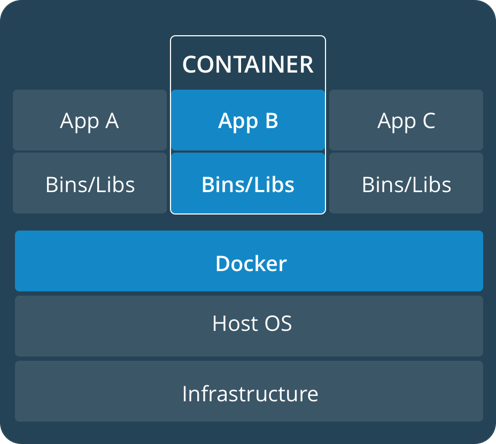
- Containerization packages an application together with its runtime, libraries, and system dependencies into a portable image.
- The same image runs in development, CI, staging, and production, eliminating the “it works on my machine” class of bugs.
- Docker is the most widely used platform for building and running containers.
- A common CD pipeline extension:
- CI builds a container image after tests pass
- The image is pushed to a registry (Docker Hub, GitHub Container Registry, …)
- The deployment target pulls and runs the new image
Practical: from theory to practice
Goal: extend the Flights API with a Jest + SuperTest test suite, then run it automatically on every pull request through GitHub Actions.
- Starting point: the Flights API at the end of Lecture 12
- Routes, controllers, models, SQLite database
- JWT authentication on
POST /flightsandDELETE /flights/:id
- Additions in this session:
- Jest and SuperTest as development dependencies
- Split between
app.js(exported app) andserver.js(listening server) validateFlightBodyextracted from the controller as a pure functiontests/folder:setup.js, one unit-test file, two service-test files.github/workflows/ci.ymlworkflow that runs the suite on every push and pull request
Installing dependencies and scripts
jestandsupertestare dev dependencies, they ship with the project but are not loaded in production.- Two new scripts:
npm testruns the full suite (also used by the CI workflow)npm run test:coverageproduces an HTML report undercoverage/lcov-report/index.html
- The
jestblock configures the runner globally:testEnvironment: "node"no browser DOM is needed for backend testssetupFilesruntests/setup.jsonce before any test file is loaded
Splitting app.js and server.js
- The Express application must be importable by the tests without binding a port or opening the database.
app.jsbuilds and exports the app;server.jsis the only place that callsinitDb()andapp.listen().
app.js
require("dotenv").config();

const express = require("express");
const swaggerUi = require("swagger-ui-express");
const YAML = require("yamljs");

const flightsRouter = require("./routes/flights");
const authRouter = require("./routes/auth");

const app = express();

app.use(express.json());
app.use(express.static("public"));
app.use("/flights", flightsRouter);
app.use("/", authRouter);

const swaggerDocument = YAML.load("./openapi.yaml");
app.use("/api-docs", swaggerUi.serve, swaggerUi.setup(swaggerDocument));

module.exports = app;
server.js
npm startrunsserver.jsnpm testloadsapp.jsdirectly;server.jsis never executed during testing
A test setup file
- Several tests need
process.env.JWT_SECRETto be defined beforeapp.jsis loaded, the auth middleware reads it as soon as it is required. - A small
tests/setup.jsfile is registered inpackage.jsonunderjest.setupFiles. Jest loads it once, before any test file runs.
tests/setup.js
- Defining the secret here makes the suite reproducible: no
.envfile is needed for tests, and CI does not need a repository secret. - Production secrets still come from
.env(locally) or platform secrets (CI/staging/production),setup.jsonly affects the test environment.
Unit test: input validation
- The original
createcontroller function for creating flights had its validation inline. - Extracting it into a pure function makes it a perfect unit-testing target:
- no
req, nores, no database access. - same input always produces the same output.
- no
- The function is exported alongside the controller actions so the test file can import it directly.
- Three cases cover the relevant branches:
- All fields valid →
null - A required field missing →
/required/ durationof the wrong type →/number/
- All fields valid →
controllers/flightsController.js
function validateFlightBody({ origin, destination, duration }) {
  if (!origin || !destination || duration === undefined) {
    return "origin, destination and duration are required";
  }
  if (typeof duration !== "number") {
    return "duration must be a number";
  }
  return null;
}

module.exports = { validateFlightBody, getAll, getById, create, remove, getPassengers };
tests/validateFlightBody.test.js
const { validateFlightBody } = require("../controllers/flightsController");

describe("validateFlightBody", () => {
  test("returns null when all fields are valid", () => {
    const body = { origin: "Seoul", destination: "Tokyo", duration: 120 };
    expect(validateFlightBody(body)).toBeNull();
  });

  test("returns an error when a required field is missing", () => {
    expect(validateFlightBody({ origin: "Seoul", destination: "Tokyo" }))
      .toMatch(/required/);
  });

  test("returns an error when duration is not a number", () => {
    expect(validateFlightBody({
      origin: "Seoul", destination: "Tokyo", duration: "120"
    })).toMatch(/number/);
  });
});
Service test: GET /flights/:id
- The model is replaced by
jest.mock(...)so the controller is exercised in isolation. - Three cases mapped to status codes:
404: no flight with that id200: flight exists, body matches500: model throws an error
beforeEach(jest.clearAllMocks)resets call history between tests.toHaveBeenCalledWith(1)checks that the controller converted the URL string"1"into a number before calling the model.
tests/flights.test.js
const request = require("supertest");
const app = require("../app");

jest.mock("../models/flightsModel");
const flightsModel = require("../models/flightsModel");

beforeEach(() => { jest.clearAllMocks(); });

describe("GET /flights/:id", () => {
  test("returns 404 when the flight does not exist", async () => {
    flightsModel.findById.mockResolvedValue(undefined);
    const res = await request(app).get("/flights/999");
    expect(res.statusCode).toBe(404);
    expect(res.body).toEqual({ error: "Flight not found" });
  });

  test("returns 200 and the flight when it exists", async () => {
    const flight = { id: 1, origin: "New York", destination: "London", duration: 415 };
    flightsModel.findById.mockResolvedValue(flight);
    const res = await request(app).get("/flights/1");
    expect(res.statusCode).toBe(200);
    expect(res.body).toEqual(flight);
    expect(flightsModel.findById).toHaveBeenCalledWith(1);
  });

  test("returns 500 when the model throws", async () => {
    flightsModel.findById.mockImplementation(() => {
      throw new Error("DB failed");
    });
    const res = await request(app).get("/flights/1");
    expect(res.statusCode).toBe(500);
  });
});
Service test: POST /flights (protected)
- Protected endpoints have two failure modes:
- 401 from the auth middleware (token missing or invalid)
- 400 from the controller (body fails
validateFlightBody)
- The valid token is signed once at the top of the file using the same
JWT_SECRETthattests/setup.jsdefined. not.toHaveBeenCalled()assertions confirm that the request is rejected before reaching the model, proving the layers fire in the right order.
tests/flights.protected.test.js
const request = require("supertest");
const jwt = require("jsonwebtoken");
const app = require("../app");

jest.mock("../models/flightsModel");
const flightsModel = require("../models/flightsModel");

const validToken = jwt.sign(
  { sub: 1, username: "alice" },
  process.env.JWT_SECRET,
  { expiresIn: "1h" }
);

beforeEach(() => { jest.clearAllMocks(); });

describe("POST /flights", () => {
  const validBody = { origin: "Seoul", destination: "Tokyo", duration: 120 };

  test("returns 401 when no Authorization header is sent", async () => {
    const res = await request(app).post("/flights").send(validBody);
    expect(res.statusCode).toBe(401);
    expect(flightsModel.create).not.toHaveBeenCalled();
  });

  test("returns 400 when the body is missing required fields", async () => {
    const res = await request(app)
      .post("/flights")
      .set("Authorization", `Bearer ${validToken}`)
      .send({ origin: "Seoul", destination: "Tokyo" });
    expect(res.statusCode).toBe(400);
    expect(flightsModel.create).not.toHaveBeenCalled();
  });

  test("returns 201 with the created flight when token and body are valid", async () => {
    const created = { id: 42, ...validBody };
    flightsModel.create.mockResolvedValue(created);
    const res = await request(app)
      .post("/flights")
      .set("Authorization", `Bearer ${validToken}`)
      .send(validBody);
    expect(res.statusCode).toBe(201);
    expect(res.body).toEqual(created);
  });
});
Service test: DELETE /flights/:id (protected)
- Same file as the previous slide,
tests/flights.protected.test.jsgroups every protected route in one file. - Three cases for
DELETE /flights/:id:401: noAuthorizationheader404: token valid, flight does not exist (removereturnsfalse)204: token valid, flight removed (removereturnstrue)
- A
204 No Contentresponse carries no body,res.bodyis{}in SuperTest.
tests/flights.protected.test.js (continued)
describe("DELETE /flights/:id", () => {
  test("returns 401 when no Authorization header is sent", async () => {
    const res = await request(app).delete("/flights/1");
    expect(res.statusCode).toBe(401);
    expect(flightsModel.remove).not.toHaveBeenCalled();
  });

  test("returns 404 when the flight does not exist", async () => {
    flightsModel.remove.mockResolvedValue(false);
    const res = await request(app)
      .delete("/flights/999")
      .set("Authorization", `Bearer ${validToken}`);
    expect(res.statusCode).toBe(404);
    expect(res.body).toEqual({ error: "Flight not found" });
  });

  test("returns 204 with no body when the flight is removed", async () => {
    flightsModel.remove.mockResolvedValue(true);
    const res = await request(app)
      .delete("/flights/1")
      .set("Authorization", `Bearer ${validToken}`);
    expect(res.statusCode).toBe(204);
    expect(res.body).toEqual({});
    expect(flightsModel.remove).toHaveBeenCalledWith(1);
  });
});
Running coverage locally
- Each file is reported with its statement, branch, function, and line coverage.
- Expected pattern for this project:
- Routes and
app.js→ 100% (every route is hit) flightsController.js→ partial (only the tested endpoints are covered;getAllandgetPassengersremain untouched)authMiddleware→ high (exercised by the protected tests)- Models → low, they are mocked, so their source code is never executed during tests. This is expected at the service-test layer.
- Routes and
- Opening
coverage/lcov-report/index.htmlreveals exactly which lines were exercised, line by line.
Adding the GitHub Actions workflow
- A single workflow file is added to the repository:
.github/workflows/ci.yml. - The workflow installs dependencies with
npm ciand runs the test suite on every push and pull request targetingmain. - No repository secrets are required for the tests to pass:
tests/setup.jssetsJWT_SECRETto a fixed test value before any test file runs. - The real production secret stays in
.env(locally) or in platform secrets (staging/production), it is never committed and is not needed by the test job.
Opening a pull request
- The full sequence for the first run:
- Create a feature branch (e.g.,
tests-and-ci) and commit the tests, theapp.js/server.jssplit, and the workflow file - Push the branch to GitHub
- Open a pull request targeting
main - GitHub Actions detects the workflow and triggers a run automatically
- The PR page shows the workflow status; click the run to inspect the logs of each step
- On a green check, the PR can be merged into
main; on a red cross, the logs point to the failing step or test
- Create a feature branch (e.g.,
- After merging, the same workflow runs again on
main(because of thepush: branches: [ main ]trigger), confirming the main branch stays green.
Practical recap
- The Flights API now has:
app.jsexporting the configured app +server.jsas the runtime entry pointvalidateFlightBodyextracted from the controller as a pure, testable functiontests/setup.jsproviding a fixedJWT_SECRETfor the test environmenttests/validateFlightBody.test.jsthree unit teststests/flights.test.jsthree service tests forGET /flights/:idtests/flights.protected.test.jssix service tests coveringPOST /flightsandDELETE /flights/:id.github/workflows/ci.ymlrunning the suite on every push and pull request tomain
- This is the same structure expected in the final project
- Unit tests and service tests for your own routes
- A working GitHub Actions workflow that runs the suite automatically
- Use this lecture’s Flights API repository as a template.
Course wrap-up
Course recap
This course covered the full path from a static page to a tested, secured, integrated web application:
- HTML, CSS, and the DOM
- JavaScript, asynchronous programming, and
fetch - HTTP, REST, and client–server communication
- Backend development with Node.js and Express
- Data persistence with SQL and SQLite
- Authentication, authorization, and security
- Testing and CI/CD
What’s next
- Web development is a big field, and this course covered the foundations in a shallow level.
- Some directions to continue:
- Frontend frameworks: React, Vue, Svelte for building larger interactive UIs
- TypeScript: type-safe JavaScript, almost mandatory in modern frontend and backend codebases
- Production databases: PostgreSQL (relational) and MongoDB (document) instead of SQLite
- Deployment platforms: Vercel and Netlify for frontends; Railway, Fly.io, Render for full-stack apps
- End-to-end testing: Playwright for browser-level test automation
- Security in depth: the full OWASP Top 10 and API Security Top 10
- The roadmap.sh roadmaps remain the best reference for choosing what to learn next.
Acknowledgements
- Some contents of this lecture are partially adapted from:
- Harvard CS50’s Web Programming with Python and JavaScript, licensed under CC BY-NC-SA 4.0.
- Materials from University of Washington’s CSE 154 Web Programming (used with permission).
- The Odin Project (main website code under MIT license and curriculum licensed under a CC BY-NC-SA 4.0)
- The Fundamentals of Web Application Development (Web Edition) ©2025 Nicholas D. Freeman. All rights reserved. The content is provided for educational purposes only and is not an exhaustive treatment of the subjects.
- freeCodeCamp.org © 2025 freeCodeCamp.org. All rights reserved. The content is provided for educational purposes only and is not an exhaustive treatment of the subjects.
- Node.js for Beginners by Ulises Gascón. Some contents adapted under fair educational use for instructional purposes.

Web Programming